 Radiant
 Inventory and Collection, kept apart
Stock for sale is operational: searchable, sortable, scan-first. Your own collection is visual: shelves, binders and progress. They are different jobs, so they are different screens.
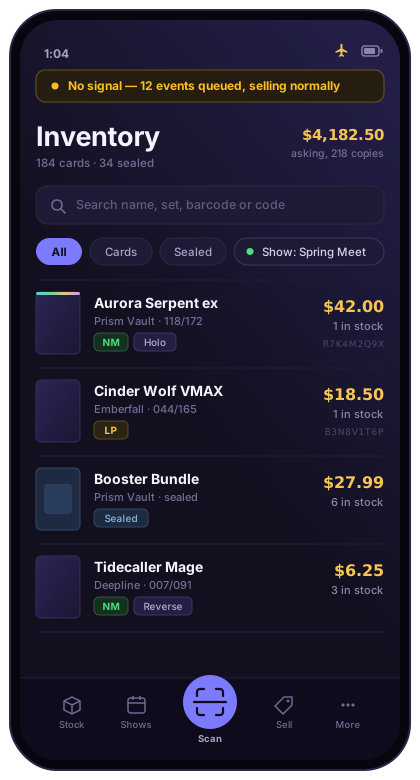
Your stock, your costs and your whole sales history live on your device — not on a server you're renting from somebody. Scan a card, price it, print a label and sell it at the table, with the signal off the entire time.
What local-first means
Two promises in one word. It works with no connection — a card show is the worst network you will ever sell on, so the app was built not to care. And your records are yours: they are written to your phone as they happen, and they stay there whether or not you ever sign in.
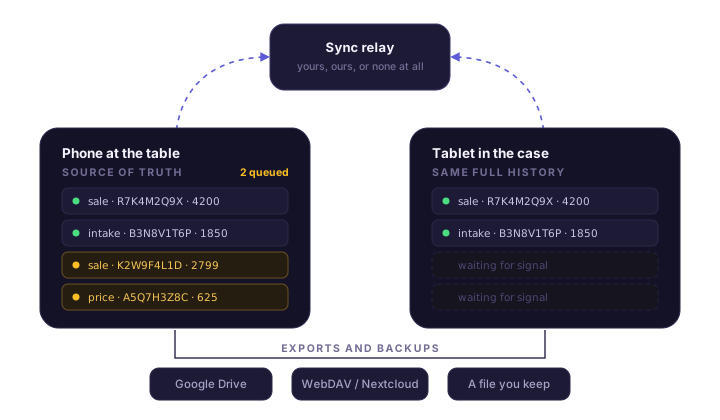
Every intake, price change and sale is written down on the device in your hand. Any device can rebuild everything it knows from that record alone, so there is no server holding the only real copy.
Not a degraded fallback — the state the app expects to be in. Signing in lives in Settings and controls syncing, never whether you can use the app or take money.
Exports are ordinary files you can open without us. Back up to your own Drive, Dropbox, Nextcloud or a folder. Run the whole thing on your own server if you'd rather.
One card, front to back
Six steps, in the order they actually happen at a table. Every one of them works with the connection off.
Point the camera at a card, or a barcode at a sealed box. Bulk mode keeps the camera open so a whole stack goes in without touching the screen between cards.
Radiant matches what it read against the catalog — set, number, variant. When it isn't sure it says so and lets you type the card number instead of quietly guessing.
Market prices come from a catalog mirrored nightly, per-condition where real per-condition data exists. Your pricing rules turn a market price into your asking price.
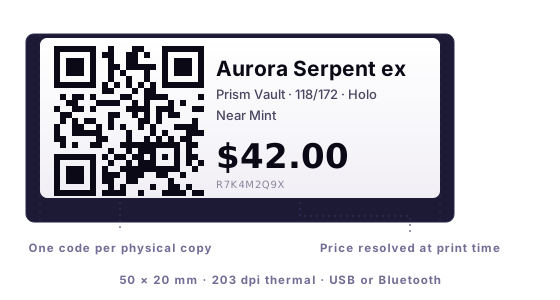
Print a 50×20mm thermal label: name, set, number, condition, your price, and a QR code that belongs to that one physical copy and no other.
Scan the label at the table. The exact copy leaves stock at the exact price, in one tap, whether or not anything is online. Multiple items check out as one transaction.
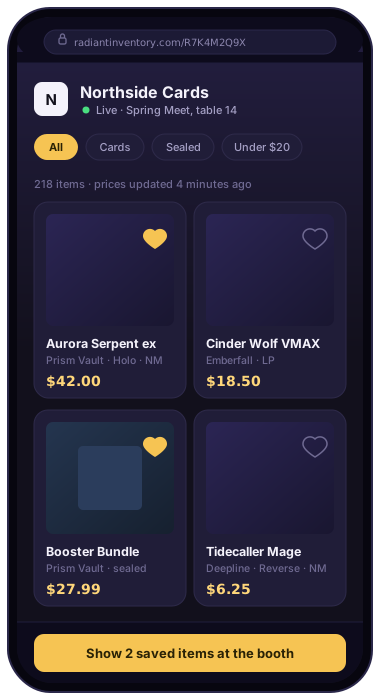
The customer scans the same code and gets a live page for that card on their own phone. When a copy sells, its page retires itself.
The first of three
Every copy gets a label, and that label carries a QR code belonging to that copy for as long as it exists. Scan it to sell it. A customer scans the same code to read about it.
The second of three
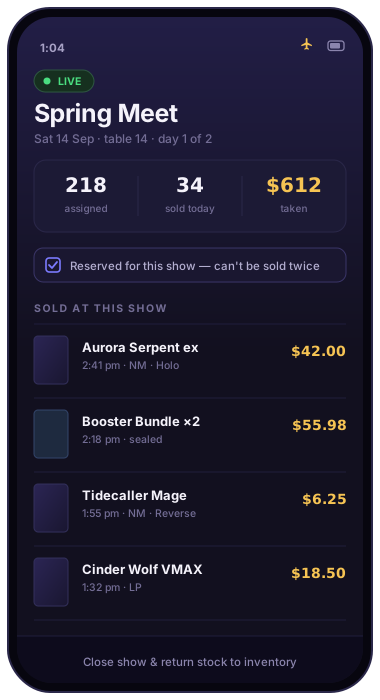
Pick what you're taking, assign it to the event, and the app treats that show as its own object — with its own stock, its own takings and its own ending.
The third of three
They scan the code on your table, step out of the crush, and browse everything you brought from their own phone — the cards in the case, the stock in the binders, with your current prices on them. Then they come back knowing what they want.
What makes those three possible
Most inventory tools track a card and a quantity. Radiant tracks copies. Three of the same card are three records, with three conditions, three costs, three prices and three permanent codes — which is the only reason a label can be scanned to sell the right one, and the only reason a customer's phone can show the exact copy in front of them.
Stock for sale is operational: searchable, sortable, scan-first. Your own collection is visual: shelves, binders and progress. They are different jobs, so they are different screens.
Set a rule once — a percentage of market, a floor, a rounding — and it follows the copies you assigned it to. Prices resolve when they're read, so a label and a listing never disagree.
Near Mint through Damaged, priced from real per-condition market data where it exists rather than a guess applied to one number.
Take the phone round the tables and leave the tablet in the case. New sales reach the other device in about a second, and whatever happened offline catches up on its own.
Google Drive, WebDAV or Nextcloud, or a plain file you keep. Exports are yours to read without us, and a device can rebuild its entire state from its own history.
The pages your customers see carry your shop name, your logo, your contact details and your links — on your own domain if you self-host.
Self-hosting
The paid plan buys hosting and support from us. It does not buy the features. If you're technically inclined enough to run your own backend, you get the whole app — sync, multiple users, your own domain, all the branding — with no monthly fee, because you're no longer costing us anything to run.
Self-hosting isn't a stripped tier. It's the same app pointed at your own storage and your own relay, with the branding unlocked.
Customers scanning your codes land on your address, with your name in it. Nothing in the experience mentions us unless you want it to.
It runs on your hardware, so a licence is a matter of trust rather than enforcement. Buy one, support the work, unlock the branding.
Pricing
The plan you're on is about branding and hosting, not features held back. Nothing that helps you sell sits behind a wall — including the customer-facing QR code, which is free.
One person, one phone, a table on a Saturday
$0 to start
When a second person joins you at the booth
— announced at launch
Run the whole thing on your own infrastructure
— one-time, announced at launch
* Plans and prices are not final and will change. Radiant Inventory is in private beta, nothing is for sale yet, and which features land in which plan is still being worked out — the shape above is the intent, not a commitment. Final pricing will be published here before anything goes on sale, and the early-access list hears first. In-app card payments — taking a customer's card at your own table — are in development and are not available yet.
Questions
That your data lives on your device rather than on our server, and that the app is built to work whether or not it can reach anything. You can scan, price, print and sell with the phone in aeroplane mode. Syncing and backup are things you turn on because they're useful, not things the app needs in order to function. If we vanished tomorrow, your records would still be on your phone and still exportable.
Yes, and that's the point. The app opens, scans, prices from the catalog it already downloaded, prints labels and completes sales with no connection at all. Anything that needs to travel — a sale reaching your other device, a backup, a Showroom update — queues up and goes when there's signal.
English-language Pokémon sets today — about 32,500 products across 217 sets, refreshed nightly. Japanese, Korean and Chinese cards aren't in the catalog yet; they can be entered and sold, but Radiant won't pretend to know a market price for them. Sealed product is handled by barcode.
An Android phone or tablet is the only requirement. To print labels you also need a 203 dpi thermal label printer that takes 50×20mm media and connects over USB or Bluetooth. A handheld barcode scanner is optional and speeds up a busy table.
A small backend for syncing and for serving your customer-facing pages, on hosting you control, pointed at your own domain. The app is the same app — you change where it points. It's a setup guide and an afternoon, not a devops job, but it does assume you're comfortable with a domain and a server. Everyone else should use the hosted plan, which is the same software with us running that part.
Because a printed QR code has to outlive the phone it was made on. If your identity were tied to the install, a new phone or a cracked screen would kill every laminated sign you'd already printed, with no way to claim the code back. An account is what makes “print it once” a promise rather than a hope. You can use the app fully signed out; the account matters when a code or a sync does.
Your device keeps everything, because it already had everything. Exports are readable files you hold, backups go to storage you control, and self-hosting exists precisely so a business can run without depending on us. A lapsed plan costs you hosted sync and branding, not your inventory.
Not yet. Radiant records what you sold and for how much, whatever way the customer paid you. Accepting card payments in the app is in development and will be announced here when it's real.
Not yet. It's in private beta on Android, installed directly, and is being used at real shows while the remaining public-release work is finished. iOS isn't planned in the near term.
Nothing. Scanning your code opens an ordinary web page. There's no customer account, no sign-up and no app — what they save is remembered on their own phone.
Early access
Radiant Inventory is in private beta. If you sell at shows, run a case at a shop, or just want your collection to stop living in a spreadsheet, get in touch and you'll hear first — including when prices are set.
Email hello@radiantinventory.comNo list, no newsletter, no tracking on this page. An email reaches a person.